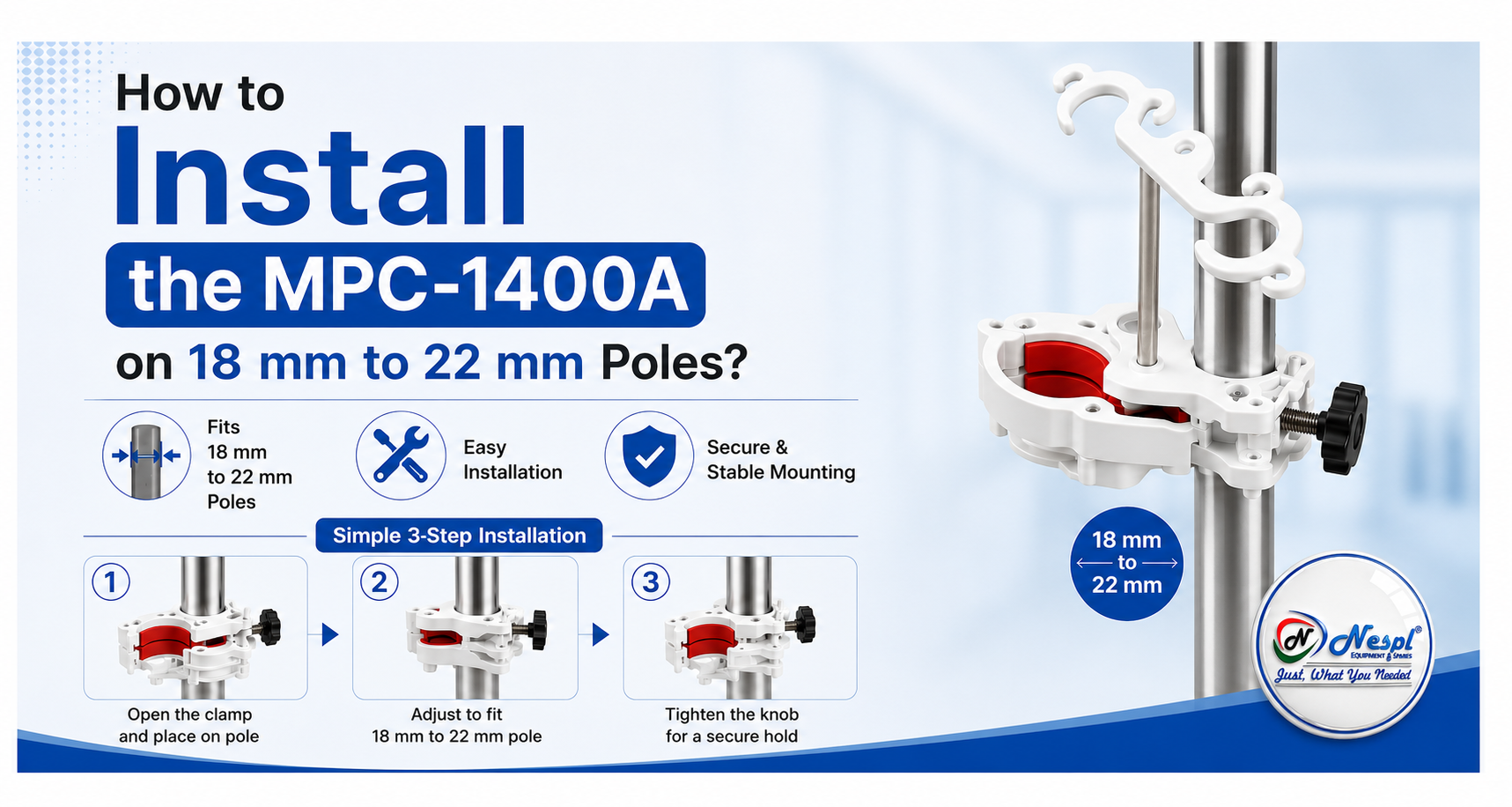
Proper installation of dialysis accessories is essential for maintaining a safe, organized, and efficient treatment environment. The MPC-1400A dialyzer holder is designed to provide secure support for dialyzers while helping healthcare professionals keep dialysis setups neat and accessible.
Designed for use with standard IV poles ranging from 18 mm to 22 mm in diameter, the MPC-1400A can be installed quickly and securely when the correct procedure is followed. This guide explains the installation process step by step to help ensure safe and reliable operation.
For any doubt & Query write us at: sales3@natronequipments.com
What Is the MPC-1400A?
The MPC-1400A is a dialyzer holder designed to mount on standard IV poles measuring 18 mm to 22 mm (approximately 3/4″ to 7/8″) in diameter. It also features an integrated drip chamber post, making it a practical accessory for dialysis machine setups.
Its compact design helps support proper dialyzer positioning while improving workspace organization during dialysis procedures.
Before You Begin
Before installing the MPC-1400A, inspect both the IV pole and the holder.
Make sure the pole:
- Is between 18 mm and 22 mm in diameter.
- Is clean and free from grease or debris.
- Is stable and free from damage.
Also inspect the MPC-1400A for any signs of wear, cracks, damage, or loose components. Do not use the holder if any defects are found.
Step 1: Verify the Pole Diameter
The MPC-1400A is designed specifically for poles measuring between 18 mm and 22 mm.
Using the holder on poles outside this range can affect stability and performance. A pole that is too small may not provide a secure grip, while a pole that is too large may prevent proper installation and could damage the clamp.
Step 2: Select the Mounting Position
Choose a mounting location that allows easy access to the dialyzer during treatment.
The holder should not interfere with:
- Tubing pathways
- Machine controls
- Alarm indicators
- Patient movement
- Other mounted accessories
A properly selected position helps create a clean and efficient dialysis setup.
Step 3: Open the Clamp
Loosen the clamp enough to fit around the IV pole.
There is no need to completely remove the clamp components unless required by your facility’s standard operating procedures. Keep the holder aligned during installation to ensure proper positioning.
Step 4: Position the Holder
Place the MPC-1400A around the pole and hold it firmly in the desired position.
Ensure the dialyzer holder faces the correct direction for the intended workflow. The drip chamber post should also be positioned so that tubing can be routed naturally without unnecessary stretching, twisting, or sharp bends.
Step 5: Tighten the Clamp
Securely tighten the clamp until the holder is firmly attached to the pole.
Once installed, the holder should not:
- Rotate
- Slide downward
- Shift during normal use
- Wobble when touched
Avoid applying excessive force while tightening, as over-tightening may damage the clamp or the pole surface.
Step 6: Check Stability
After installation, perform a quick stability check.
Apply gentle hand pressure and confirm that:
- The holder remains firmly in place
- The clamp does not slip
- The bracket remains straight
- The drip chamber post is secure
- Tubing pathways remain unobstructed
If any movement is observed, reposition the holder and tighten the clamp as needed.
Step 7: Install the Dialyzer
Once the holder is securely mounted, place the dialyzer into the holder according to your facility’s operating procedures.
Ensure the dialyzer is seated properly and supported evenly. If the dialyzer appears loose or unstable, recheck the installation before proceeding.
Step 8: Perform a Final Safety Inspection
Before clinical use, conduct a final inspection of the complete setup.
Verify that:
- The holder is securely attached
- The IV pole is stable
- The dialyzer is properly positioned
- Tubing connections remain unrestricted
- The setup supports safe and efficient operation
A final inspection helps minimize installation-related issues during treatment.
Maintenance Recommendations
Regular inspection and maintenance can help extend the service life of the MPC-1400A.
To maintain reliable performance:
- Clean the holder according to approved facility protocols
- Inspect the clamp and mounting components regularly
- Check for signs of wear, corrosion, cracking, or loosening
- Replace damaged components immediately
Routine maintenance helps ensure continued safety and performance.
Common Installation Mistakes to Avoid
To achieve the best results, avoid the following common mistakes:
- Using the holder on poles outside the recommended diameter range
- Installing the holder on unstable or damaged poles
- Mounting the holder too close to other accessories
- Forcing the clamp onto oversized poles
- Leaving the holder loose after installation
- Ignoring routine inspections and maintenance
Avoiding these issues helps improve stability and reliability during use.
Source Genuine MPC-1400A Accessories from NESPL
Using quality dialysis accessories is important for maintaining safe and efficient healthcare operations.
At NESPL, we supply a wide range of medical-grade components, dialysis accessories, fluid handling products, connectors, fittings, and healthcare solutions from globally recognized brands. With years of industry experience, we support hospitals, healthcare facilities, medical device manufacturers, and distributors with reliable products and responsive customer service.
Whether you are looking for the MPC-1400A dialyzer holder or other dialysis-related components, our team can help you find the right solution for your application.
Conclusion
Installing the MPC-1400A on an 18 mm to 22 mm IV pole is a straightforward process when the correct steps are followed.
By selecting the proper mounting position, securing the clamp correctly, and performing a thorough stability check, healthcare professionals can create a safer and more organized dialysis setup.
With proper installation and routine maintenance, the MPC-1400A provides reliable dialyzer support and helps improve workflow efficiency in dialysis environments.